


A bank connection can import transactions automatically without making your books accurate. Effective client accounting services monitor whether those imports are complete, review how transactions are recorded and reconcile the results against independent bank statements. The connection reduces data entry, but it does not replace accounting judgement.
For an Oakville or GTA business owner, that distinction matters when reviewing cash balances, preparing GST/HST returns or deciding whether there is enough money for payroll. A disconnected feed, duplicate withdrawal or incorrectly matched customer payment can distort those decisions even when the accounting software looks up to date.
Reliable monitoring follows a repeatable process: confirm that each connection is working, investigate exceptions, request supporting documents and reconcile every account. The service agreement should also identify who reviews problems, who approves corrections and when the business owner needs to respond.
What client accounting services monitor in a bank feed
An automated bank feed transfers transaction information from a financial institution into accounting software. Depending on the connection, downloads may be delayed, require renewed authorization or show transactions differently from the bank’s online portal.
Monitoring therefore covers three separate questions:
- Connection health: Is every expected bank and credit card account connected and importing current information?
- Transaction accuracy: Has each imported item been matched or recorded correctly, with appropriate supporting documents?
- Account completeness: Does the accounting record reconcile to the bank statement after legitimate timing differences are considered?
These checks are related but not interchangeable. A working connection can import a duplicate transaction, and a correctly categorized transaction can still belong in a different reporting period.
Bank-feed monitoring is also different from payment authorization. Access to imported transactions should not automatically give an accounting provider permission to move money. Those permissions need separate consideration.
How the monitoring workflow works
Check that every expected account is importing
The starting point is an account register covering business bank accounts, credit cards, lines of credit and other relevant financial accounts. Each entry should identify the account owner, connection method and person responsible for renewing authorization.
A reviewer checks the last successful import, any connection warnings and whether recent posted transactions are arriving. An account with no activity is not necessarily disconnected, so the reviewer must compare feed status with expected business activity rather than relying on transaction dates alone.
Problems can follow a password change, expired authorization, bank maintenance or an account replacement. The appropriate response may be to reconnect the account, wait for an identified delay or obtain a statement for a controlled manual import.
Within client accounting services, connection monitoring should leave a record of the issue, the affected dates and the action taken. Otherwise, a temporary workaround can create an unnoticed gap or overlap when the feed resumes.
Review transactions before accepting suggested entries
Accounting software may suggest a supplier, account category or invoice match. A reviewer still needs to establish what the transaction represents.
For example, a $489 withdrawal might already be recorded as a supplier bill payment. Matching the withdrawal to that payment preserves one expense. Adding a new expense instead can record the cost twice and leave the original bill appearing unpaid.
Other checks include transfers between business accounts, credit card payments, personal spending through a business account and transactions imported both manually and through the feed. A credit card payment generally reduces the card liability rather than creating a second expense for purchases already recorded.
Bank rules deserve particular attention. A rule based on a familiar supplier name can misclassify an unusual purchase, such as equipment bought from a retailer normally used for office supplies.
The review performed through client accounting services should focus on the underlying transaction, not simply clearing the software’s review queue. Uncertain items need evidence or a question for the owner, not a convenient category chosen to finish the task.
Reconcile against an independent bank statement
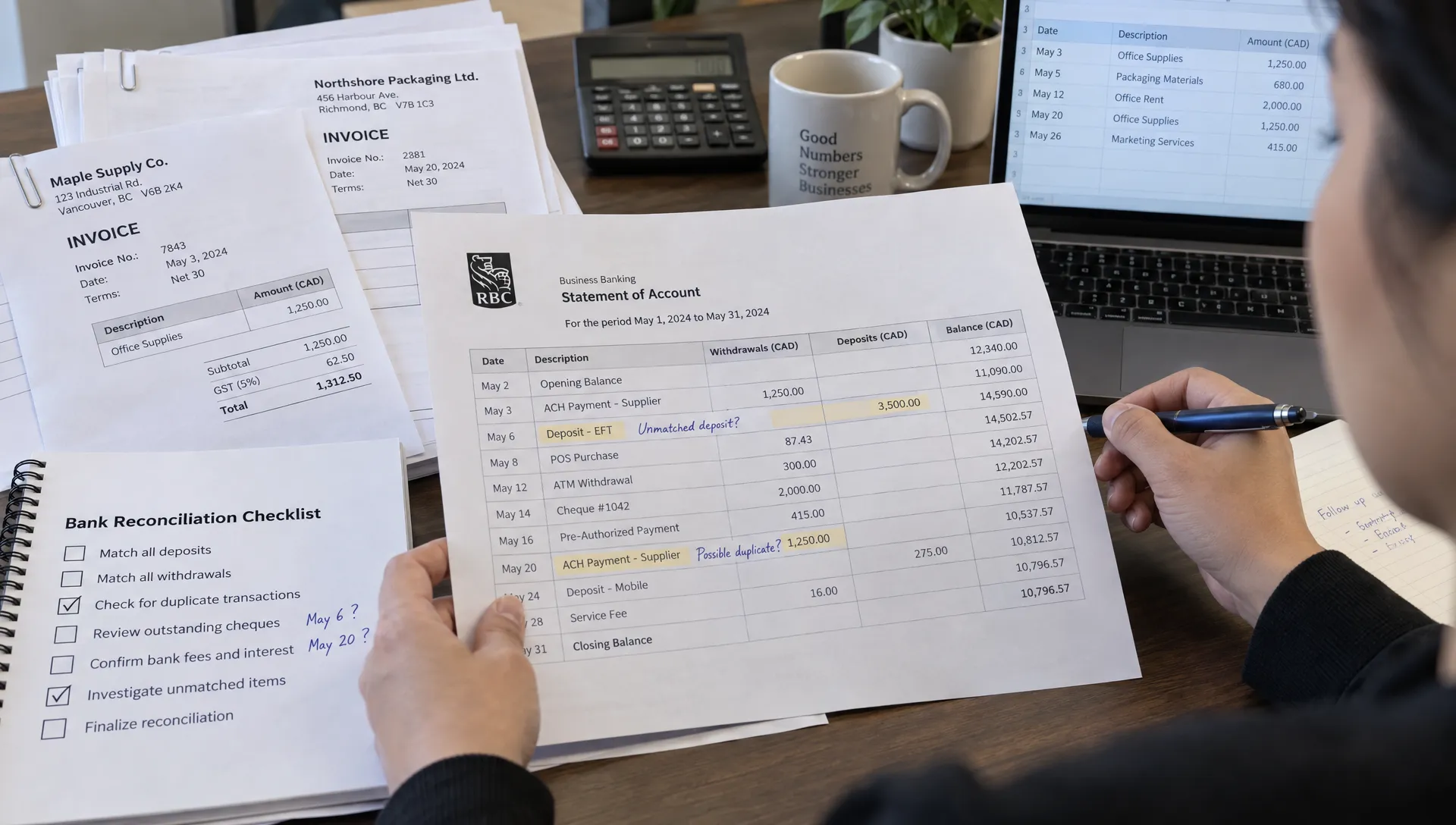
An empty bank-feed queue is not a completed bank reconciliation. Reconciliation compares the accounting records with an independent bank statement for a defined period.
The reviewer accounts for legitimate timing differences, such as an issued cheque that has not cleared. They also investigate unexplained differences, missing bank charges, duplicate entries and transactions recorded in the wrong account.
Statement reconciliation remains necessary even when the software displays a connected bank balance. The feed and accounting records may share the same missing information, while a displayed balance may reflect different timing or transaction statuses.
A reconciliation should identify the statement period, closing balance, outstanding items and preparer. Where the engagement includes a separate review, that approval should also be documented.
For client accounting services, the objective is a supportable balance, not merely a zero difference produced by an unexplained adjustment. Corrections should retain enough detail for another person to understand what changed and why.
Assign exceptions instead of leaving them unresolved
An exception is a transaction or connection issue that cannot be resolved through the normal workflow. Useful exception tracking records the amount, account, reason for investigation, responsible person and next action.
| Exception | What needs checking | Typical next action |
|---|---|---|
| Missing transactions | Connection status and affected dates | Restore the feed and check for gaps before importing manually |
| Possible duplicate | Amount, date and existing ledger entry | Confirm whether both entries represent the same transaction |
| Unidentified deposit | Customer records and payment references | Match the receipt to the correct invoice or other source |
| Unusual withdrawal | Supporting documents and authorization | Ask the designated business contact to verify the payment |
| Transfer recorded as income | Corresponding movement in another account | Match both sides and correct the classification |
| Old outstanding cheque | Payment history and supplier status | Investigate whether it remains payable or needs another action |
An unfamiliar payment is a reason to investigate, not proof of fraud. If the owner suspects an unauthorized transaction, they should contact the financial institution promptly rather than wait for the next accounting review.
A useful exception report makes client accounting services actionable by showing which unresolved items could affect cash reporting, tax treatment or the reporting deadline.
Apply Canadian tax and payroll checks beyond the feed
Bank descriptions rarely contain enough information to determine Canadian tax treatment. A supplier name and withdrawal amount do not establish whether GST/HST was charged, whether an input tax credit is available or whether the expense was business-related.
The CRA’s guidance on GST/HST input tax credits explains eligibility and supporting-document requirements. Reviewers need the relevant invoice or receipt rather than assuming the tax amount from a bank withdrawal.
Payroll needs a similar separation. Employee net-pay withdrawals do not represent the full payroll expense. The accounting records must also reflect deductions, employer contributions and related liabilities using payroll reports. Payments to the CRA then need to be applied against the appropriate balances.
Payment processors introduce another difference. If a processor reports $1,000 collected and $30 withheld in fees, a $970 bank deposit alone does not explain the underlying sales, taxes, refunds or settlement activity. The processor report provides the missing detail.
Timing matters too. An annual subscription receipt may arrive before all the related services have been delivered. Businesses with recurring billing can explore how subscription revenue accounting separates collections from earned revenue. A bank-feed match confirms a cash movement, not necessarily the correct revenue recognition.
Agree on review frequency and owner responsibilities
There is no single monitoring schedule suitable for every business. Transaction volume, payment activity, cash constraints and reporting needs should determine the frequency.
A business making frequent supplier payments may need connection checks and exception reviews each business day. A lower-volume company may use a less frequent schedule, supported by formal monthly reconciliation. These are possible arrangements, not universal service standards.
The agreement should specify:
- Review frequency: When connections, transactions and reconciliations are checked, including holiday coverage where relevant.
- Escalation rules: Which issues require immediate contact and which can wait for a scheduled review.
- Document deadlines: When the owner must provide receipts, explanations and approvals to support timely reporting.
- Reporting cut-offs: When unresolved items will delay completion or be disclosed as limitations in management reports.
Responsibilities should be explicit. The accounting provider may investigate a withdrawal, but the owner or an authorized employee usually needs to confirm its business purpose. Payment approval should remain with designated people under the business’s authorization policy.
Well-scoped client accounting services make these dependencies visible. The provider cannot reliably resolve an undocumented purchase or unknown deposit simply because it appears in a connected account.
Protect access and preserve the audit trail
Bank-feed monitoring involves sensitive financial information. Access should be limited to what each person needs, using individual accounts rather than shared logins wherever the systems support them.
Use supported bank-authorization methods and multi-factor authentication where available. Confirm separately what permissions exist at the bank and inside the accounting software. A connection that only imports transactions does not necessarily restrict a user’s broader software permissions.
Businesses should also establish who can create bank rules, change account mappings, edit completed periods and delete transactions. Significant changes need traceable records and appropriate approval. Reach Professional’s overview of bookkeeping controls that protect financial data explains how access restrictions and separation of duties support this process.
When an employee or external provider leaves, remove their access and review any continuing authorizations. Include this step in the offboarding process rather than waiting for a connection problem.
Security arrangements for client accounting services should be documented alongside the accounting workflow. Monitoring may help identify unusual activity, but it is not a guarantee that fraud or unauthorized payments will be detected.
What to ask before choosing a provider
Ask a prospective provider to explain a transaction’s path from bank import to reconciled reporting. Their answer should distinguish automated suggestions from human review and identify where owner approval is required.
Request an anonymized example or blank template of an exception report and reconciliation checklist. Ask who investigates a broken connection, how manually imported transactions are checked for duplicates and what happens when supporting documents arrive late.
Referrals and accounting firms’ outreach on Reddit can introduce you to providers, but neither demonstrates how they handle your bank data. Evaluate the documented process rather than the visibility of the firm’s marketing.
Also clarify the boundary between monitoring, bookkeeping, tax work and financial advice. Effective client accounting services can connect these activities, but they are not automatically all included in the same engagement. Written scope prevents assumptions about who is checking what.
Frequently asked questions
Do automated bank feeds replace bank reconciliation? No. Feeds import transaction data, while reconciliation checks the accounting records against an independent statement. Reconciliation helps identify omissions, duplicates and timing differences that reviewing imported transactions alone may miss.
Should every transaction be posted automatically? Not necessarily. Carefully tested rules can reduce repetitive work, but unusual transactions, transfers, tax-sensitive purchases and uncertain matches need review. The appropriate level of automation depends on the business and its controls.
What happens when a bank feed stops working? The reviewer should identify the affected account and dates, investigate the connection and document any workaround. If a manual import is needed, it should be checked against existing entries and later feed activity to prevent duplication.
How often should my accounting provider review bank feeds? Set the frequency according to transaction volume, cash risk and reporting deadlines. Ask the provider to distinguish connection checks, transaction review and statement reconciliation. Client accounting services should specify these separately rather than promise vague ongoing monitoring.
Make bank-feed oversight part of your bookkeeping discussion
If your accounting software is connected but balances remain unreliable, start by reviewing the monitoring process rather than adding more automation.
Reach Professional provides bookkeeping, accounting, tax and business advisory services for Oakville and GTA businesses. Discuss your accounts, transaction volume and reporting needs with its professional bookkeeping team to clarify the support you need, the review schedule and the responsibilities that remain with your business.